


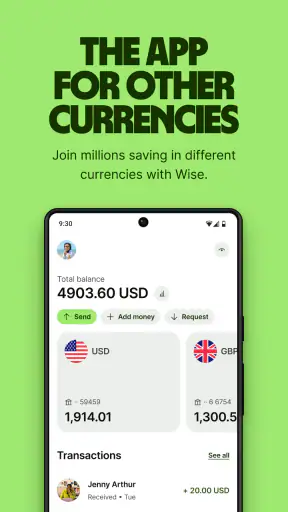


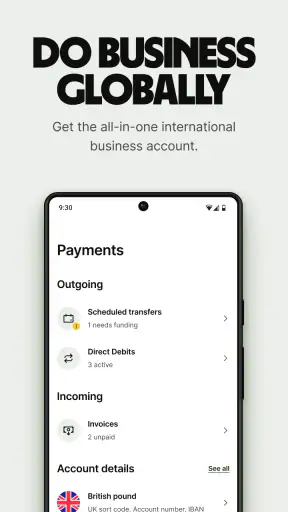
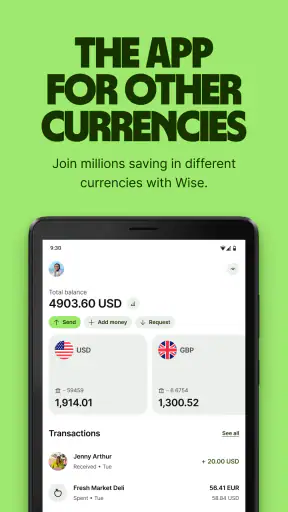
I approached Wise: International Transfers as someone who wanted a practical way to handle money across borders without turning a simple transfer into a confusing banking project. It is a finance app from Wise Payments Ltd., and its central idea is straightforward: send, receive, and spend worldwide from one place. That sounds simple, but the useful part is how the app brings those tasks together for people who deal with more than one currency.
My first impression was that this is not an app designed to replace every part of a traditional bank. It is better understood as a focused tool for international money movement. If you regularly pay someone abroad, receive income from another country, travel, or keep balances in different currencies, it can fit naturally into your routine. If all your financial activity happens in one country and one currency, its broader purpose may be less important to you.
The app is free to install and is rated for Everyone, which makes it approachable for a wide range of users. Its popularity is also easy to see: it has passed 50 million installs and holds an average rating of 4.8. Those figures do not guarantee that every transfer will feel effortless, but they do suggest that Wise has become a familiar option for people looking beyond conventional international banking.
Getting comfortable with the app before sending money
What the first screen is really asking you to do
When I review a money app, I pay attention to whether it explains the next action or simply presents a wall of financial terminology. Wise generally works best when I treat it as a guided process rather than as a dashboard to explore randomly. The important early questions are practical: where the money is going, which currency is involved, how much should arrive, and how I intend to fund the transaction.
That mindset helps first-time users avoid a common mistake: starting with a vague goal such as “I need to move money abroad.” A clearer goal is “I need a specific amount to reach a recipient in another currency.” Once the destination and currency are known, the transfer flow becomes much easier to understand. I recommend having the recipient’s correct details ready before opening the send process, because stopping halfway to search for them makes the experience feel more complicated than it needs to be.
The app’s store summary, “Send, receive, spend worldwide,” is a useful description of its scope, but those activities are not identical. Sending money is an action with a recipient and a destination. Receiving money is about making it possible for funds to reach you. Spending is connected to how you use your available money after it has arrived. Keeping those purposes separate in your head makes the interface easier to navigate.
Setting up an account without rushing
Wise is free, but that does not mean the setup should be treated casually. This is a financial service, so I would use my real personal details and take time to read each screen instead of tapping through automatically. The exact checks and prompts can depend on the account and transaction, so the sensible approach is to answer accurately and keep any requested information close at hand.
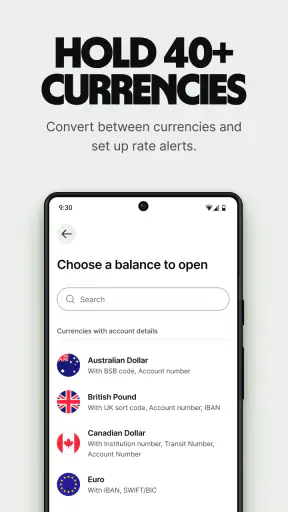
One practical tip is to decide in advance which currency you expect to use most often. A person receiving freelance income from overseas has a different starting point from a traveler who mainly wants to spend while away. Thinking about that use case helps you recognize whether you are setting up Wise for occasional transfers, recurring payments, or everyday access to money in another currency.
The app is available for devices running Android 7.0 or later, and the current version is 9.39.0. That makes compatibility worth checking before installation, especially if you are using an older phone. Wise has been available since March 24, 2014, so this is an established product rather than a newly launched experiment, but I would still keep the app updated when possible because financial apps depend heavily on current security and service support.
The first meaningful success: completing a transfer
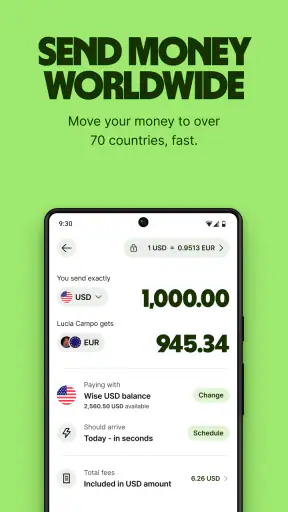
The first successful action I would recommend is a small, planned transfer rather than a large urgent one. Start by entering the amount and destination currency, then review what the recipient is expected to receive. The most important screen is not the first one you see; it is the final review before confirmation. That is where I would check the recipient, currency, total cost shown by the app, and the expected arrival information.
This review step is also where Wise differs from the vague experience people sometimes have with traditional banks. With a conventional bank, the international option may be hidden inside a general payments area, and the final amount can be difficult to interpret. Wise puts the cross-border purpose closer to the center of the experience. That does not remove the need to read carefully, but it gives the user a clearer opportunity to understand the transaction before proceeding.
For a realistic everyday example, imagine that I need to pay a language tutor who lives in another country. I would first confirm the tutor’s details in a separate message, open Wise, choose the relevant currencies, enter the agreed amount, and compare the displayed recipient amount with what we discussed. I would then pause before confirming. If the numbers or recipient information do not match my expectation, I would stop and resolve that difference rather than assuming the app will correct it later.
That small-transfer approach teaches you the workflow without putting a large amount at risk. It also reveals whether the app suits your personal habits. Some people want a guided international transfer tool; others prefer keeping everything inside their existing bank, even if the process is less specialized.
Receiving money requires a different kind of preparation
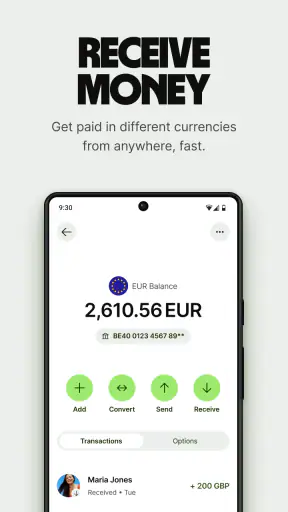
Receiving funds can feel less intuitive than sending them because the main task happens before the money moves. You need to provide the sender with the right information and make sure they understand which currency and destination to use. I would not copy details from memory or rely on an old message. I would open the relevant receiving area in the app and share the current information exactly as presented.
This is especially useful for freelancers, remote workers, and people with family in another country. Instead of asking a sender to guess which details are needed, you can give them a clear set of instructions from the app. The trade-off is that both sides must be careful. A receiving workflow is only as reliable as the information shared with the sender, so I would double-check names, currencies, and account details before a payment is initiated.
A non-obvious advantage of separating receiving from sending is that it can make recurring income easier to organize. If I receive payments from the same type of source, I can create a consistent personal checklist: confirm the currency, share the correct receiving information, watch for the incoming payment, and then decide whether to keep, convert, or spend the funds. That is more useful than treating every payment as a completely new event.
Spending worldwide without losing track of the purpose
Wise also covers spending, which makes it more than a one-time transfer utility. In my view, this is most helpful when spending and international transfers are connected but not mixed together. For example, a traveler may use Wise to manage money in a destination currency, while a remote worker may receive funds and later use them for expenses. The benefit is having a clearer relationship between the money arriving and the money being used.
Still, I would not assume that “spend worldwide” means the app should replace a local bank account for every situation. Local bills, cash needs, domestic payment habits, and personal banking requirements can vary considerably. Wise is strongest when the international part of your finances is the problem you are trying to solve. It is less compelling as a universal answer for someone who does not cross currencies at all.
One useful habit is to separate money by purpose before spending it. If I have received funds for a bill, I would avoid treating the balance as general travel money. If I am preparing for a trip, I would estimate the amount I actually intend to use instead of moving everything simply because the app makes the process convenient. This is a budgeting decision rather than a feature, but the app’s international focus makes that discipline particularly valuable.
Where first-time users commonly hesitate
The biggest source of confusion is usually not the button labels. It is the difference between the amount I send, the amount converted, the amount received, and the total cost of the transaction. Those can be related without being identical. I find it helpful to read the summary as a miniature receipt before confirming: identify the starting currency, the destination currency, the recipient amount, and the cost shown by Wise.
Another point of friction is timing. A transfer can involve more than the moment when I press the confirmation button, so I would not use an international transfer for a last-minute obligation unless I had allowed enough time and understood the displayed expectation. If a payment is urgent, I would plan ahead rather than assume that an app with a smooth interface can eliminate every external delay.
Currency conversion can also tempt users into making decisions based on a quick glance. I would compare the displayed result with the amount the recipient actually needs, not just with the amount leaving my account. This matters when a sender and recipient discuss a price in different currencies. Agreeing on who bears the conversion difference before sending prevents many avoidable misunderstandings.
Security is another reason to slow down. I would confirm the recipient through a trusted channel, avoid entering details while distracted, and review the final screen every time, even for a familiar payment. A saved routine can reduce effort, but it should never replace checking where the money is going. The convenience of Wise is most valuable when paired with deliberate habits.
How it compares with ordinary alternatives
The usual alternative is an international transfer through a traditional bank. That may be preferable for someone who wants all accounts, statements, and support in one established banking relationship. A bank can also feel more familiar if your employer, landlord, or family already works within that system. Wise has the advantage when the user wants an app built around cross-border movement instead of a general banking menu where international payments are only one small option.
Another alternative is a general payment app. Those services can be convenient when both people already use the same platform, but their usefulness may depend heavily on the recipient’s country and account. Wise is more naturally suited to people who think in terms of currencies and international destinations. I would choose the simpler general payment app for a casual payment between compatible local users, and Wise when the cross-border structure is central to the transaction.
Cash exchange and airport currency desks are a different comparison. They can solve an immediate travel problem, but they are less convenient for planned remote payments or recurring income. Wise makes more sense when I want to organize the transaction digitally and review the details before money moves. For a small amount of emergency cash, however, the fastest available local option may still be more practical than setting up a new financial workflow.
The app is not automatically the best choice for every high-stakes transfer either. If a business needs specialized accounting, approval chains, or a broader treasury process, a dedicated business banking arrangement may be more appropriate. Wise is appealing to individuals and smaller operations that value a direct, understandable experience, but simplicity should not be confused with suitability for every financial structure.
Small habits that make the experience better
My first tip is to prepare a transfer note before opening the app. Write down the recipient, destination currency, intended amount, and reason for payment. This sounds basic, but it prevents the common problem of switching between messages and the transfer screen while trying to remember details. It also makes the final review faster and more reliable.
My second tip is to treat the confirmation screen as a decision point, not a formality. I would read every important line and compare it with the agreement I made with the recipient. If the recipient amount is the key obligation, focus on that figure rather than only on the amount debited from your side. This is a small workflow improvement that can prevent expensive confusion.
My third tip is to use a separate routine for incoming money. Keep a record of who should pay you, which currency they use, and what you plan to do after the funds arrive. The app can help bring the money into one place, but it cannot decide whether you should convert it immediately, retain it for a future expense, or use it for spending. That decision deserves its own step.
My fourth tip is to test your personal process before an important deadline. A modest first transaction can show whether your details, recipient communication, and expectations all line up. I would rather discover a misunderstanding during a planned payment than while trying to meet a time-sensitive obligation.
Who should install it and who may want something else
I would recommend Wise to a person who sends money to another country, receives overseas income, travels between currencies, or wants a more focused alternative to a traditional bank’s international-transfer section. It is particularly suitable for first-time users who appreciate seeing the transaction explained in stages instead of searching through a general banking app.
I would be more cautious about recommending it to someone who only makes local payments, never handles foreign currency, or wants a full-service domestic bank replacement. The app’s value comes from its international purpose. Without that need, another financial app may be simpler because it matches the user’s actual routine more closely.
I would also tell anyone handling a large or time-critical payment to plan early and read every displayed detail. Wise can make the process clearer, but clarity is not the same as instant completion or freedom from recipient errors. The person sending the money remains responsible for checking the destination and understanding the transaction before confirming it.
My final view after using the full workflow
Wise succeeds because it gives international money tasks a dedicated home. Sending, receiving, and spending across currencies are easier to think about when they are presented as connected parts of one service rather than as an obscure option inside a conventional bank. I especially like the way the app encourages a review of the recipient amount and transaction details before completion.
Its limitations are mostly practical rather than dramatic. Users still need accurate information, patience with timing, and a clear understanding of what the displayed amounts mean. It is not a substitute for careful financial judgment, and it may be unnecessary for someone whose life is entirely local. The app also rewards users who organize their payments instead of tapping through them on autopilot.
Wise Payments Ltd. has built an approachable finance app for a very specific modern problem: moving and using money across borders without making the user start with a traditional international banking process. It is free, available to Everyone, and its strong adoption reflects how many people now work, travel, study, and support family internationally. The current version, 9.39.0, is the one I would look for when installing it on a compatible device.
My recommendation is to begin with one small, clearly planned action. Set up your account carefully, prepare the recipient information, review the currencies and final amount, and only then confirm. If that workflow matches the way you manage money, Wise can become a genuinely useful part of your financial routine rather than just another app on your phone.


